

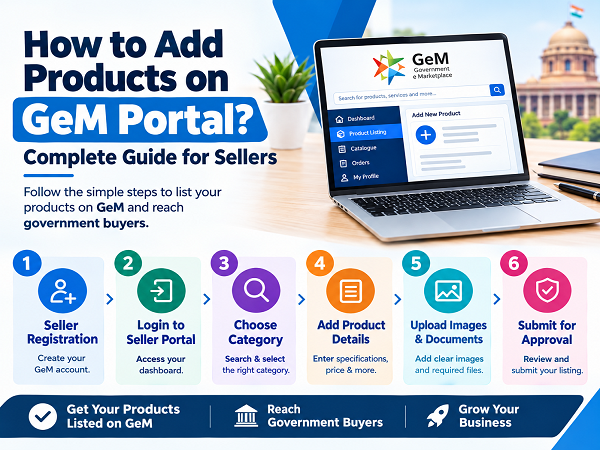
The Government e-Marketplace (GeM) provides a digital platform where government buyers can purchase products and services from registered sellers. For businesses looking to sell to government departments, having an accurate and complete GeM Product Listing is an important part of setting up their online catalogue.
If you are wondering how to add products on GeM Portal, this guide explains the basic GeM Product Listing Process, important information required, and common mistakes sellers should avoid.
What is GeM Product Listing?
GeM Product Listing is the process of adding your products to your seller catalogue on the Government e-Marketplace. A seller needs to provide relevant product information, specifications, pricing and other required details according to the applicable product category.
A properly prepared GeM Product Catalogue can make it easier for government buyers to find and compare your listed products.
How to Add Products on GeM Portal?
Follow these general steps for GeM Product Upload :
-
Complete GeM Seller Registration
Before adding products, you need an active seller account on the GeM Portal. Complete the required GeM Seller Registration and seller profile information.
Make sure your business details, contact information and other required registration details are accurate.
-
Login to Your GeM Seller Account
After completing registration, log in to your GeM Seller Portal using your registered credentials.
Access the relevant catalogue or product listing section available in your seller dashboard.
-
Search for the Correct Product Category
Selecting the correct category is an important part of the GeM Product Listing Process.
Search for your product using relevant keywords and select the applicable category. Product specifications and mandatory information can vary depending on the selected category.
-
Enter Product Details
Once the appropriate category has been selected, enter the required product information.
Depending on the category, this may include :
- Product name and model
- Brand details
- Manufacturer information
- Technical specifications
- Product dimensions
- Warranty details
- Country of origin
- Available quantity
- Pricing and other applicable information
The information should be accurate and consistent with your product documentation.
-
Add Product Images and Supporting Information
Good-quality product images and accurate product information are important for your GeM Product Catalogue.
Upload the required images and provide the information requested by the applicable category. Avoid using misleading images or incorrect specifications.
-
Submit the Product for Approval
After entering all required details, review the product information carefully before submission.
Once submitted, the listing may go through the applicable GeM Product Approval process. Sellers should monitor their account for any updates, queries or required corrections.
Documents and Information Required for GeM Product Listing
The requirements can vary depending on the product category and seller. Generally, sellers should keep relevant business and product information ready, such as :
- Brand and manufacturer details
- Product specifications
- Model number
- Product images
- Warranty information
- Applicable certificates or supporting documents
- Technical literature, wherever required
- Pricing information
- Other category-specific information
Common Mistakes to Avoid in GeM Product Listing
While creating a GeM Product Catalogue, sellers should avoid :
Listing a product under an unrelated category can create problems during the listing process.
Incorrect Specifications :
Product specifications should accurately represent the actual product.
Incomplete Information :
Missing mandatory details can affect the submission or approval process.
Incorrect Images :
Use relevant and clear product images that represent the listed product.
Mismatch in Documents :
Product details should be consistent with the supporting documents wherever applicable.
Why Professional GeM Catalogue Management Can HelpManaging multiple products on GeM can require regular attention to product information, specifications, catalogue updates and category requirements.
Professional GeM Catalogue Management services can assist businesses with product listing, catalogue creation, information preparation and related GeM seller activities.
Businesses that require assistance can also explore GeM Product Listing Services and other GeM Portal Services from experienced service providers.
Frequently Asked Questions
How do I add a product on GeM Portal?To add a product, log in to your seller account, select the appropriate product category, enter the required product specifications and information, upload the necessary details/images and submit the listing through the applicable GeM process.
What is GeM Product Listing?
GeM Product Listing is the process of adding a seller's products to the GeM catalogue with relevant specifications, images, pricing and other required information.
Can I add multiple products on GeM?Yes, sellers can create listings for their products based on the categories and processes applicable to their GeM seller account.
Why is my GeM product listing not approved?A listing may require correction or further information if the submitted details do not meet the applicable category requirements. Sellers should review the status and instructions shown on the GeM Portal.
Can a GeM Service Provider help with product listing?Yes. Businesses can take assistance from a GeM Service Provider for activities such as GeM Product Listing, catalogue management and other seller-related services.
Get Assistance With GeM Product ListingNeed help with GeM Product Listing, GeM Catalogue Creation, or GeM Catalogue Management?
GemBidSolution provides GeM Seller Services to help businesses with their GeM-related requirements.
Visit www.gembidsolution.com to learn more about our GeM Portal Services and seller support.